
HVDOSBox - Windows Terminal Fonts1.02 - Download
You'll be able to download in few seconds.
Publisher Description
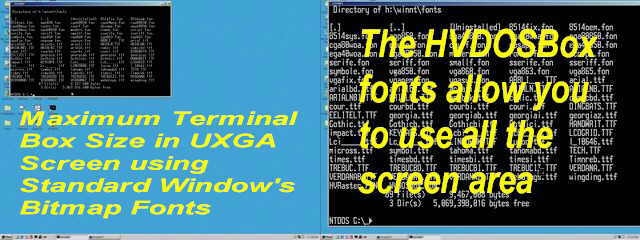
HVDOSBox is a Windows monospaced raster screen font. It is for anyone who uses Windows' Console mode or runs MS-DOS applications in a Windows Box. The HVDOSBox fonts provide greater text legibility and many more point sizes than the fonts supplied with Windows. The large range of font sizes allows a console window to be scaled to the match the size of the monitor at any resolution. The fontface is based on ProCon's Hi-Visibility HVFont which produces much stronger character glyphs and more legible punctuation characters. It uses a modified OEM Codepage 437 symbol set. Normally blank characters - like the binary NUL and ASCII 255 - are visible, and the space character can be shown as a grid to assist programmers and screen designers with code layout and design.
About HVDOSBox - Windows Terminal Fonts
This Cursors & Fonts program is available in English. It was last updated on 02 November, 2026. HVDOSBox - Windows Terminal Fonts is compatible with the following operating systems: Windows.
The company that develops HVDOSBox - Windows Terminal Fonts is Procon Systems. The latest version released by its developer is 1.02.
The download we have available for HVDOSBox - Windows Terminal Fonts has a file size of N/A. Just click the green Download button above to start the downloading process. The program is listed on our website since 2004-05-11 and was downloaded 0 times. We have already checked if the download link is safe, however for your own protection we recommend that you scan the downloaded software with your antivirus. Your antivirus may detect the HVDOSBox - Windows Terminal Fonts as malware if the download link is broken.
How to install HVDOSBox - Windows Terminal Fonts on your Windows device:
- Click on the Download button on our website. This will start the download from the website of the developer.
- Once the HVDOSBox - Windows Terminal Fonts is downloaded click on it to start the setup process (assuming you are on a desktop computer).
- When the installation is finished you should be able to see and run the program.
Program Details
System requirements
Download information
Pricing
Version History
version 1.02
posted on 2004-05-11
Disclaimer
External Download
We do not host HVDOSBox - Windows Terminal Fonts on our servers. We did not scan it for viruses, adware, spyware or other type of malware. This app is hosted by the software publisher and passed their terms and conditions to be listed there. We recommend caution when installing it.
The external download link for HVDOSBox - Windows Terminal Fonts is provided to you by apps112.com without any warranties, representations or guarantees of any kind, so access it at your own risk.
If you have questions regarding this particular app contact the publisher directly. For questions about the functionalities of apps112.com contact us.
